The $39 Doorbuster Looks Like a Deal Until You Read the Support Terms
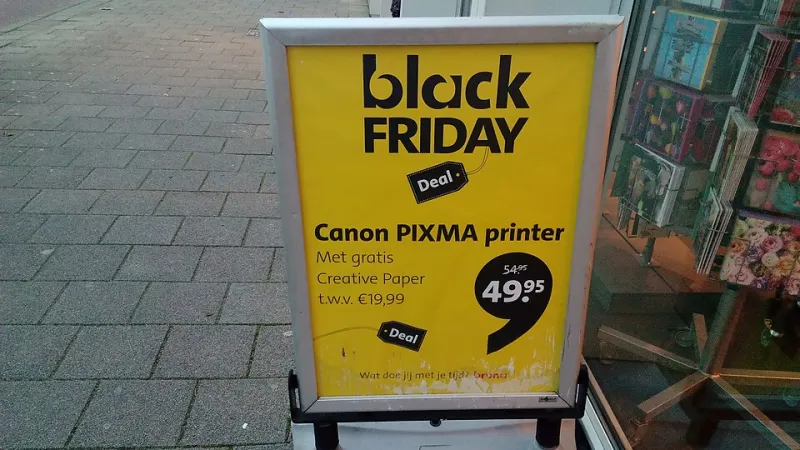
Photo: Donald Trung Quoc Don (Chữ Hán: 徵國單) - Wikimedia Commons - © CC BY-SA 4.0 International.(Want to use this image?)Original publication 📤: --Donald Trung 『徵國單』 (No Fake News 💬) (WikiProject Numismatics 💴) (Articles 📚) 20:54, 5 November 2021 (UTC), CC
Black Friday 2026 lands on November 27, and the doorbuster tables are already getting built in the back of the store. Somewhere in that pile is a printer with a two-digit price tag and a cardboard sign that says LIMIT 2 PER CUSTOMER. It will be gone by 6:15 a.m.
It is also the most expensive cheap thing in the building. You just won't find that out until roughly week six, when the starter cartridge quits and the phone number on the box turns out to be a recording.
None of this means don't buy it. It means the sticker is the least interesting number on the packaging. What decides whether you got a bargain or a subscription with a paper tray attached is the fine print you agree to at the register. Here is what to check while you're still standing in the aisle with your phone in your hand.
The Cartridge in the Box Is a Sample, Not a Supply
Almost every inkjet under $100 ships with a starter cartridge. Read the wording carefully: starter and setup cartridges usually carry 30 to 50 percent of the yield of the retail version of the same cartridge number. The box may advertise big page numbers in large type; those numbers typically describe the retail cartridge, not the one in the bag.
If the spec sheet doesn't state a yield or doesn't say whether it's a setup cartridge, assume it's a sample. That first low-ink warning is coming a lot faster than you think.
Do the Cost-per-Page Math Before You Get in Line
The formula is simple: cartridge price divided by rated page yield equals your cost per page. Do it for black and for color, because color is where budget printers quietly bleed people dry.
A worked example. A black cartridge at $34.99 rated for 200 pages works out to about 17 cents a page. The high-yield version at $54.99 rated for 600 pages drops to roughly 9 cents. Over 1,500 pages a year, that difference is real money, and it dwarfs whatever you saved on the hardware.
Then look at the color setup. Many budget models use a single tri-color cartridge, which means one empty color takes the other two down with it. Cartridge-per-color designs cost more per unit but waste less.
While you're in the aisle, pull up the manufacturer's site and confirm three things: the cartridge model number, whether that model is a store-exclusive SKU, and what the cartridges cost at retail. Store-exclusive model numbers are not automatically bad, but they tend to have fewer cartridge sales and spottier parts availability.
If the math lands above about 15 cents a page for black text, at least look at a tank-style printer or an entry laser before you commit. Higher up-front, dramatically cheaper per page, and no clogged printhead after two weeks of sitting idle.
The Word 'Included' Is Doing a Lot of Work
Watch for phrases like free ink for six months, ink included, automatic delivery, or smart ink plan. Those usually mean enrollment in a subscription at or near checkout. Before you say yes, get answers to these:
- What is the monthly page allowance, and what happens when you go over it?
- Do unused pages roll over, and is there a cap on the rollover?
- Can the monthly price change, and how much notice do you get?
- What exactly happens if you cancel mid-month, and does the printer still accept store-bought cartridges afterward?
That last one matters most. On several current subscription models, plan cartridges stop working once the plan ends, so cancelling means buying retail ink and losing whatever is left in the tank. Ask the question out loud: if I cancel, will this print with cartridges I buy at Target? If the person at the register can't answer, don't enroll there.
One Year of Hardware, Sometimes 90 Days of People
Most consumer printers carry a one-year limited hardware warranty. The support window is a separate thing and it is often shorter. Plenty of models bundle a complimentary setup period of 30 to 90 days; after that, troubleshooting may be self-service only, chat only, or paid.
Before you buy, confirm:
- Warranty length and type: carry-in, depot, or advance exchange.
- Whether phone support is covered for the full warranty or only the first 90 days.
- Whether the model has a published US support line with stated hours, or community forums only.
- Whether the model number actually appears in the manufacturer's support database. Some store-exclusive SKUs come up blank, and that is a bad sign for parts and firmware.
- Whether the toner or ink is covered. Consumables usually are not.
Retailer First or Manufacturer First?
This trips up more people than any hardware failure. The short version:
- Inside the return window and the box is defective or you hate it: call the retailer. That is a return, not a warranty claim.
- Dead on arrival but past the return window: manufacturer warranty, with the receipt ready.
- Firmware, drivers, setup, won't-connect, weird error codes: manufacturer support.
- Damage you caused, or a printer out of warranty: a local repair shop or a replacement.
Keep the box until the return window closes. Photograph the receipt and the serial number sticker the day you unbox it, because the serial number is what gets you past the phone tree later.
The Two-Minute Pre-Checkout Checklist
Cost per page for black and color. Starter cartridge yield. Subscription terms and cancellation behavior. Warranty length and type. Whether live phone support is included and for how long. Return window and restocking fee. Whether the retailer's protection plan duplicates the manufacturer warranty, because you rarely need both.
The Bottom Line
A cheap printer is a bet that ink stays cheap and support stays free. Those bets usually lose. Buy the $39 doorbuster if the per-page math works and you know exactly who you're calling in month seven. Walk away if the only way to hit that price was a page-capped plan with a cancellation clause you had to squint to read.